Google’s ‘Look up’ app for Googlebook has arrived on the Play Store, and for now it can also be installed on phones. The release follows two other recent Googlebook utilities, Magic Pointer and Desktop Camera, expanding the set of tools tied to the platform.
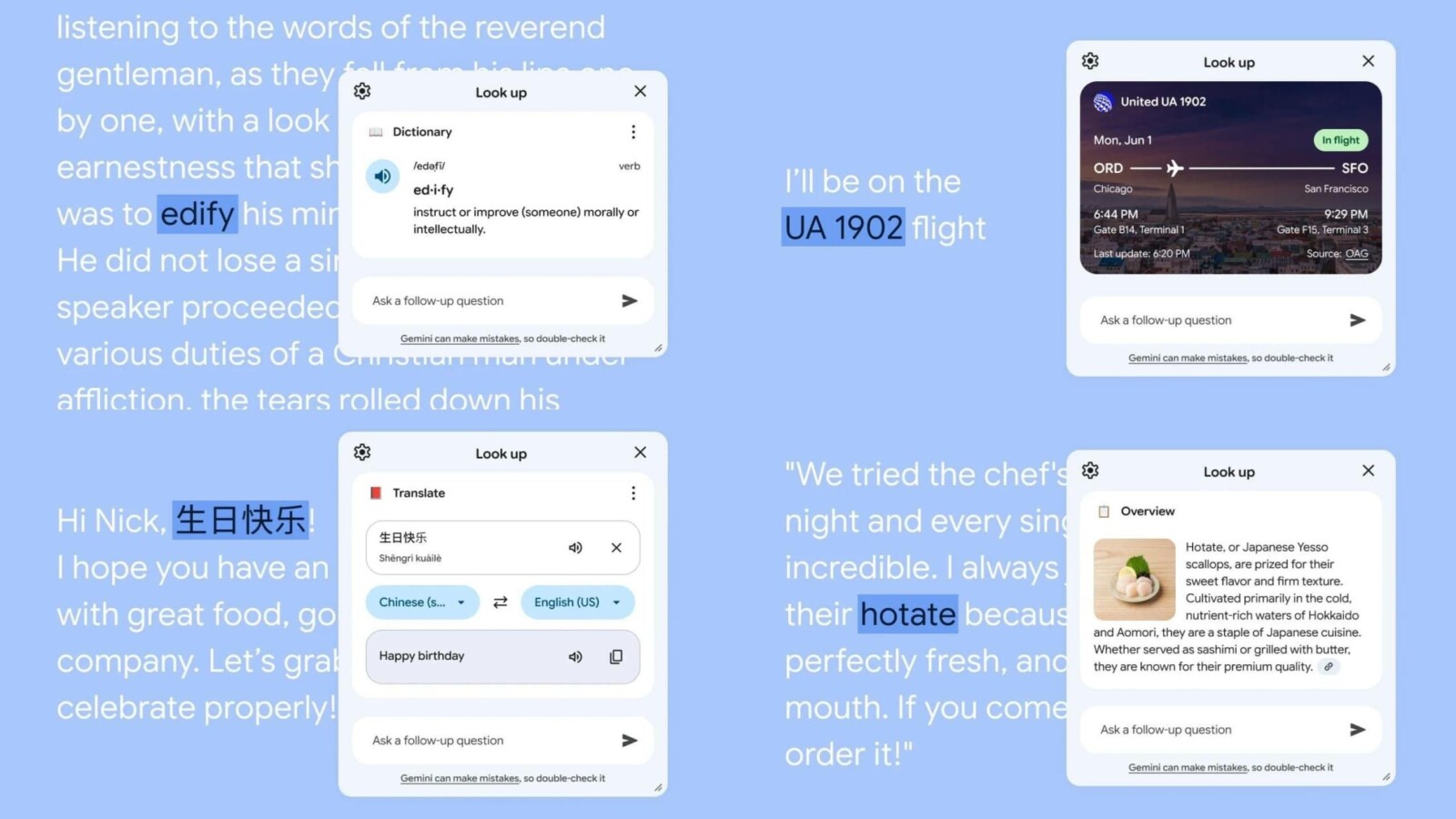
The app is designed to let users highlight text and dig deeper into it. According to Google, you can select “a concept you want to explore, a new word, a trip destination, and more.” Doing so opens a floating window that surfaces contextual results relevant to whatever you highlighted.
What ‘Look up’ Does
Screenshots show the app pulling in several types of information, including a dictionary, a flight tracker, an “Overview,” and a translator. At the bottom of the panel, an “Ask a follow-up question” field delivers a conversational Gemini experience, letting users continue the interaction naturally. The Play Store icon reflects this design, featuring a pair of glasses badged with the Gemini spark.
Google says the tool “will use publicly available information from the relevant Google service (e.g. Search, Maps, Flights) to provide the best response in a helpful format.” In practice, highlighting text brings up “Look up” as a menu option, which then opens the floating panel with results.
Built for Googlebook, Available on Phones for Now
The desktop interface and the app’s package name, com.google.android.desktop.contextualtools, confirm that the software is intended for Googlebook. Even so, the app can currently be installed on phones as of today. This appears to be unintended, and Google is expected to restrict phone availability soon.
The feature is roughly comparable to the similarly named “Look Up” option on macOS, which appears when users right-click on selected text. Both approaches aim to give quick, contextual information without leaving the current screen.
The arrival of ‘Look up’ comes as more Googlebook hardware moves toward release. Recent leaks and reveals have included the final UI for the Googlebook Desktop Camera app, the first Asus Googlebook, and a full-size Lenovo Googlebook. The ‘Look up’ app is available now on the Play Store.
Source
Image: 9to5google.com