Motion Assist is now beginning to reach phones running Android 17, and Google is deploying the feature gradually. If you’re wondering whether it has arrived on your device yet, there are a few quick ways to find out.
The fastest method is to open the Settings app and search for “motion assist.” Alternatively, you can navigate manually by going to Settings, then Google, then the All services tab, followed by Personal & device safety, and finally Motion Assist. The feature sits next to Advanced Protection and Theft protection, and it is delivered as part of Google Play services rather than a full system update.
How Motion Assist Works
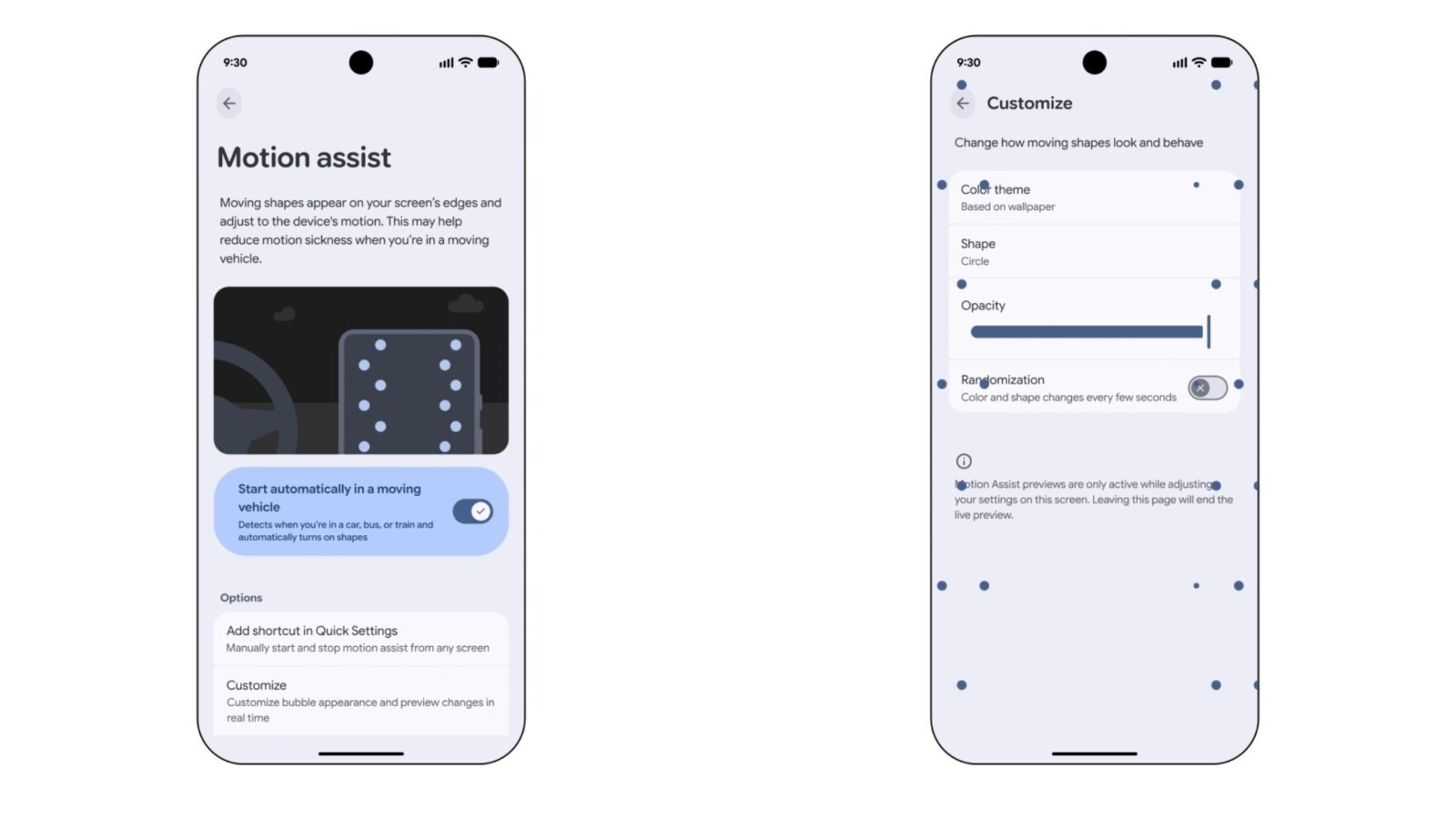
Once the feature is available, the preference menu allows you to have Motion Assist automatically “Start in a moving vehicle.” Google also recommends adding the Quick Settings Tile, which lets you turn the feature on or off manually from any screen. You can add the tile directly from the settings page or through the standard edit screen under “From system apps.” When Motion Assist is active, a system notification appears that lets you disable it with a single tap.
The tool displays moving shapes that adjust to your device’s motion. According to Google, these visuals “may help reduce motion sickness when you’re in a moving vehicle.” On the Pixel 11 Pro Fold, three columns of shapes appear along the left and right edges, while Google’s standard phone example shows two columns.
Customization Options
The Customize menu gives you several ways to adjust the on-screen visuals. You can set the color based on the system theme or choose from red, yellow, green, or blue. Shape options include circle, square, pentagon, and diamond. A slider controls opacity, and a randomization setting can change the color and shape every few seconds.
Rollout Status
Motion Assist is not yet widely available. The feature has been spotted with version 26.33.32 of Google Play services, but there is also a server-side component that controls activation. That means simply having the right app version does not guarantee access. As testing shows, the feature currently appears on only one device even across similar hardware.
Because the rollout relies on both an app update and a server-side flag, availability will continue to expand over the coming days and weeks. Checking the Settings app search and confirming your Google Play services version remain the two most reliable ways to see whether Motion Assist has reached your phone.
Source
Image: 9to5google.com